A desktop without Wi-Fi, or with an old Wi-Fi 5 chip, takes a PCIe card in a spare slot and gets current wireless in five minutes. The hard part is choosing which generation, because a Wi-Fi 7 card only behaves like one when your router and your copy of Windows support it too. This guide starts there, then compares the cards actually on sale in October 2026.
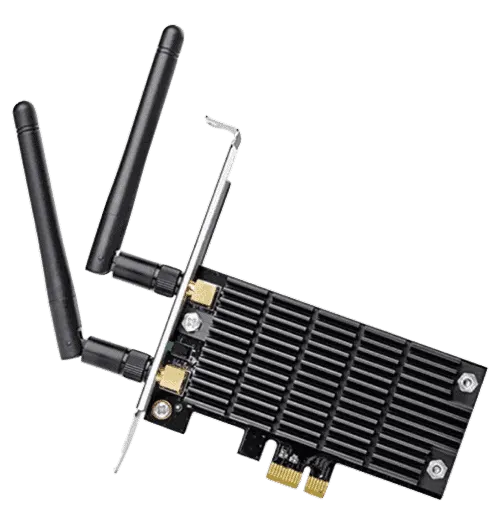
Wi-Fi 7 or Wi-Fi 6E: what decides it
Three things, and you can check all of them before you spend anything.
Your router
Wi-Fi 7's headline features are 320 MHz channels and Multi-Link Operation (MLO), which uses more than one band at once. TP-Link's own card pages say both need support from the access point as well as from the PC. The Wi-Fi Alliance adds that 320 MHz channels exist only in the 6 GHz band. So a Wi-Fi 7 card on a Wi-Fi 6 router runs as a Wi-Fi 6 card, and a router without 6 GHz can't give you either 6E or full Wi-Fi 7.
Your Windows version
Intel's current wireless driver page (updated 20 October 2026) says Wi-Fi 7 features start with Windows 11 version 24H2, and that 6 GHz depends on Windows 11 support. ASUS's spec pages say the same. Several Wi-Fi 7 cards below list Windows 11 only. If you're staying on Windows 10, buy a card that lists it.
Your motherboard
These are small cards that need one free PCIe slot; ASUS and Gigabyte specify x1, the shortest kind, which fits any longer slot too. Bluetooth is the part that catches people out. Gigabyte's GC-WIFI7 needs a free internal USB 2.0 header on the board as well as the slot, and without one you'll have Wi-Fi but no Bluetooth. Check the card's install guide for the same requirement before you close the case.
PCIe Wi-Fi cards compared
| Card | Standard | Max link rate (6 / 5 / 2.4 GHz) | Bluetooth | Windows |
|---|---|---|---|---|
| TP-Link Archer TBE550E (BE9300) | Wi-Fi 7 | 5764 / 2882 / 688 Mbps | 5.4 | 11 (64-bit) only |
| ASUS PCE-BE92BT | Wi-Fi 7 | 5764 / 2882 / 688 Mbps | 5.4 | 11; full Wi-Fi 7 needs 24H2 |
| Gigabyte GC-WIFI7 | Wi-Fi 7 | up to 5800 Mbps, 320 MHz | 5.3 | 11 only |
| TP-Link Archer TBE400E (BE6500) | Wi-Fi 7 | 2882 / 2882 / 688 Mbps | 5.4 | 11 only |
| ASUS PCE-BE6500 | Wi-Fi 7 | 2882 / 2882 / 688 Mbps | 5.4 | 11; full Wi-Fi 7 needs 24H2 |
| TP-Link Archer TXE75E (AXE5400) | Wi-Fi 6E | 2402 / 2402 / — Mbps | 5.3 | 10 and 11 (listed inconsistently) |
| TP-Link Archer TX55E | Wi-Fi 6, no 6 GHz | no 6 GHz; 5 and 2.4 GHz only | 5.2 | 10 and 11 |
Which card to buy
The table sorts most of it. Here's how the choices break down.
Full Wi-Fi 7: TP-Link Archer TBE550E or ASUS PCE-BE92BT
These two have identical band rates: 5764 Mbps on 6 GHz, 2882 on 5 GHz and 688 on 2.4 GHz, with Bluetooth 5.4. Both put the antennas on a magnetic base on a cable, so you can stand them on top of the case instead of leaving them behind it among the cables. TP-Link gives the base a 1 m lead and includes a low-profile bracket for small cases. ASUS notes that 320 MHz also depends on support from the motherboard side. Buy whichever is cheaper on the day.
Wi-Fi 7 for less: TP-Link TBE400E or ASUS PCE-BE6500
The BE6500-class cards halve the 6 GHz rate to 2882 Mbps and keep everything else, Bluetooth 5.4 included. Even a 1 Gbps internet plan is about a third of 2882 Mbps, so unless you move big files across your own network, this tier gives up little you'd notice online.
Gigabyte GC-WIFI7
It's rated up to 5800 Mbps with 320 MHz, but it ships with Bluetooth 5.3 and needs that internal USB header. A European retailer's listing also warns that card revisions use different chipsets and that some may not work on every platform, so check the revision against your board before buying.
Windows 10 or a Wi-Fi 6E router: TP-Link Archer TXE75E
An Intel-based Wi-Fi 6E card with 2402 Mbps on both 6 and 5 GHz and Bluetooth 5.3. TP-Link's page lists Windows 10 and 11 in one place and Windows 11 in another, so confirm the driver for your Windows version on the support page first.
Older router: TP-Link Archer TX55E
If your router is Wi-Fi 6 or Wi-Fi 5, a 6 GHz card has nothing to talk to. The TX55E is plain Wi-Fi 6 with Bluetooth 5.2 and supports Windows 10 and 11.
What about an Intel M.2 module on an adapter?
Some builders put Intel's BE200 module into a cheap PCIe adapter. It's a real Wi-Fi 7 part: 2x2, three bands, 320 MHz, up to 5.8 Gbps and Bluetooth 5.4, on an M.2 module that uses both PCIe and USB (Intel's spec page). Two cautions apply.
- The BE200 on AMD systems is a known problem area. One reviewer found it wasn't detected at all on a Ryzen 5 5600X machine, and Intel's own forum staff have given conflicting answers. Intel's spec page says nothing either way.
- The BE201 looks similar but isn't a PCIe part at all. It uses Intel's CNVio3 interface, so it only works in a board built for it and won't run in an adapter (Intel).
A finished card from the table costs more, but it comes with its own drivers, antennas and support page.
Should a gaming PC be on Wi-Fi at all?
If a cable can reach, a cable is the simpler answer for online games: no interference from neighbours' networks and nothing to configure. Our Ethernet cable guide covers which cable you need (it's less than the packaging suggests). When a cable can't reach, a good card and a router placed with some care get you close; see our router tips for gaming. For a laptop or a PC with no free slot, a USB model from our Wi-Fi adapter guide is the alternative.
How we compiled this guide
We didn't run our own speed tests. Every spec comes from the maker's product or spec page, and the Windows and Wi-Fi 7 requirements come from Intel and the Wi-Fi Alliance, all checked on 25 October 2026.